One platform · projectetch.com · 2026

Marketing forgets.
Etch doesn't.

The permanent record for marketing campaigns. Every brief, asset, and approval — etched to an immutable identifier you can still find five years from now. Every module plus the Intelligence layer — one workspace, one source of truth.

Private beta · early access by invitation for marketing operations teams

See it in 80 seconds

From its name to its results.

One campaign through Etch: named and approved in Taxonomy, briefed, built and signed off in Brief, kept in the Vault as it went out, and learned from in Intelligence. Recorded in the product, with demo data.

Demo data from a fictional car maker. Your workspace, your naming rules.
Read the transcript

Marketing forgets. Etch doesn't. Etch is the permanent record for your marketing campaigns.

Your team starts on Home: what needs a decision, what's going out soon, and what Etch has flagged.

Every campaign gets a permanent ID, and a marketing identifier built from your own naming rules. So every link, platform and report speaks the same language.

Approval locks the identifier. Reviewers approve, or send it back, right from their queue.

Each brief captures the audience, the offer, the channels and the send window.

Emails are built from your own governed templates, and your QA rules check every slot, link and subject line as you type.

Brand, legal and compliance sign off, inside Etch or by link. The hand-off keeps the exact email, ready for your sending platform.

After the send, the Vault keeps the email tied to its campaign, and a seed copy shows exactly what arrived.

Results come in from HubSpot, Marketing Cloud, Braze, Klaviyo and more. And Intelligence shows you what's slipping.

It even estimates how your next email will do, from your own record.

Etch. One identifier, every artifact. Request early access at projectetch.com.

How it works

One record.
Every touchpoint.

A campaign enters Etch once. From that moment every artifact, approval, and outcome attaches to a single immutable identifier — readable across every module of the platform. The loop is the product.

01 · BriefETCH.BRIEF

A campaign brief is authored and submitted. Structured fields capture intent, audience, channel, and constraints.

02 · TaxonomyETCH.TAXONOMY

The brief takes its campaign's permanent ID, or creates the campaign and mints one. The campaign now has a permanent identity.

03 · VaultETCH.VAULT

Every send is archived against the ID: brought in from HubSpot, sent to the workspace's Vault address from any platform, sent in by API, caught by a seed address, or added by hand, and linked by its identifier.

04 · IntelligenceETCH.INTELLIGENCE

Outcomes flow back to the record. AI surfaces patterns across every campaign you've etched — feeding the next brief.

Start with any module and switch on the rest in any order. The shared Taxonomy UID is the connective tissue: the moment a second module is in use, your work is already linked, automatically.

The platform

One identifier. Every artifact.

Each module runs standalone. Expand any module to see the specifics — what it does, what's inside, and how it works better with the rest.

The source of truth for every campaign and touchpoint. Etch.Taxonomy generates a permanent UID at the moment of creation and provides the classification framework — brand, channel, audience, time — that makes campaign data queryable and comparable across systems and years.

  • CSPRNG-derived immutable System UIDs, enforced at the database layer
  • Configurable Marketing IDs with a guided ID Builder and live preview
  • No-code Metadata Designer for fields, required values, and vocabularies
  • Draft → Needs Review → Approved, fully audited, with versioning
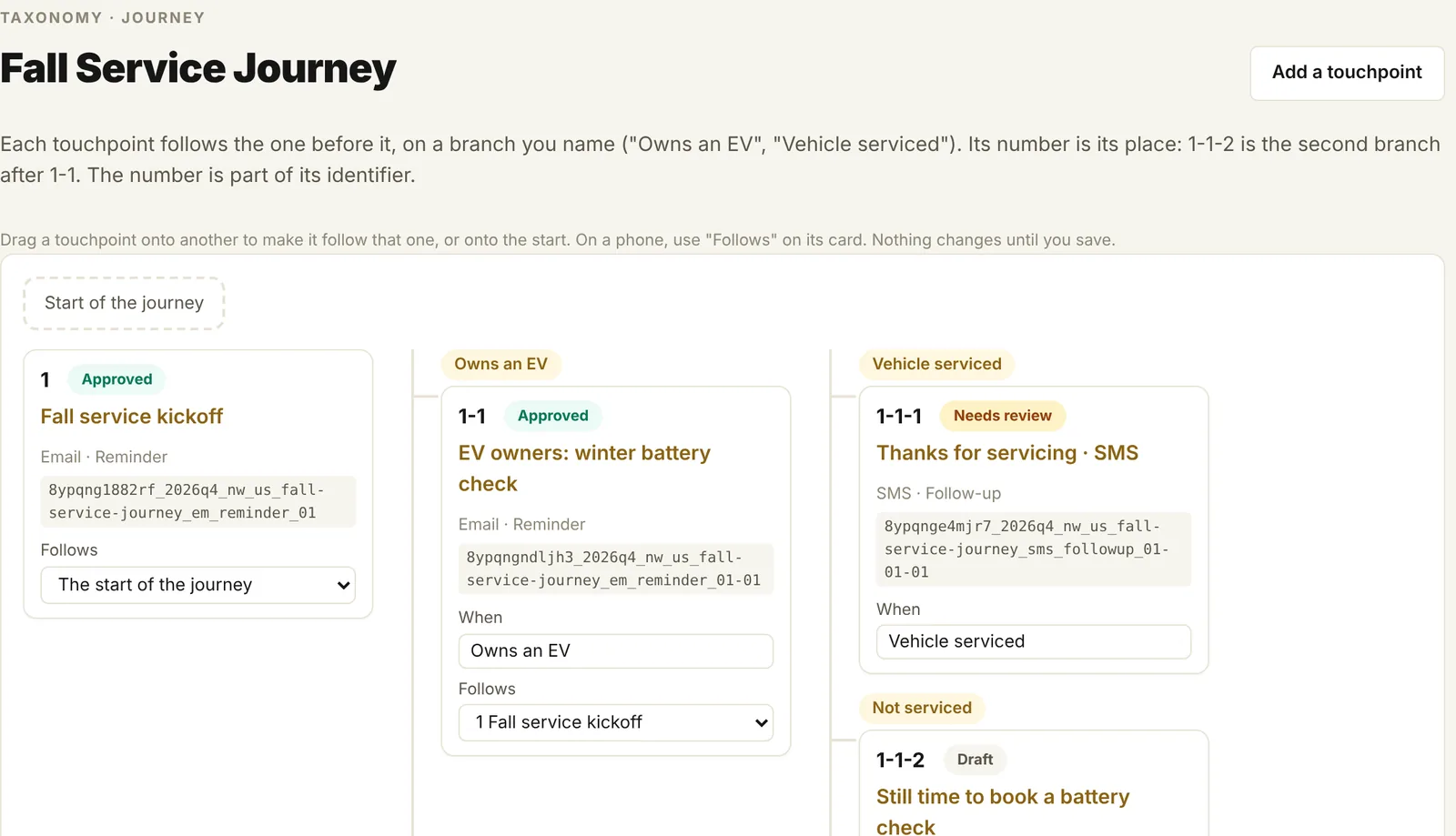
  • Campaign journeys: touchpoints in named branches, each numbered by its place
  • Bulk editor and Excel import that updates drafts by key
Hosted web SaaS REST API + MCP server Salesforce: separate native app
Etch.Taxonomy · Campaign journey
A campaign journey in Etch.Taxonomy: touchpoints on branches, each with its approval status and permanent identifier

Approved means fixed: once a campaign is approved its identifier never changes, so links, UTM tags and reports keep working. Changes to its other fields go through a proposal and re-approval, on the record. That permanent ID is what lets Brief link, Vault index, and Intelligence cite exact campaigns.

The front door for every campaign. Structured intake, your own templates with locked and editable regions, and live QA before every hand-off to your ESP. Bring your own templates — no rebuild.

  • BYO templates: annotate existing HTML into editable, lockable regions
  • Locked legal and brand blocks; writers fill only the editable slots, within their limits
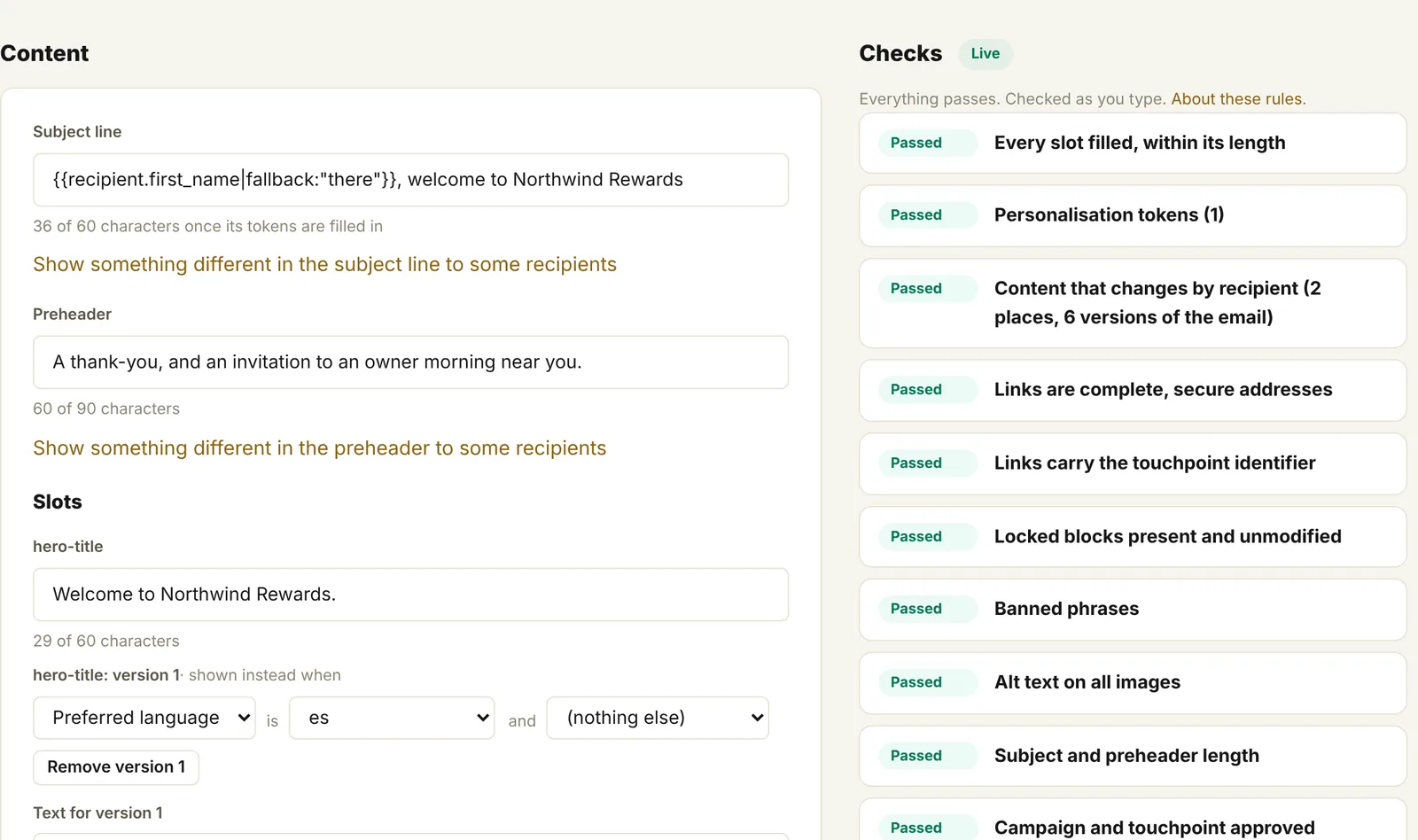
  • Live QA as you type: required slots, banned phrases, links, UTM identifiers, locked blocks, alt text, subject and preheader length
  • Dynamic modules & personalization tokens — declared in Etch, compiled at hand-off to HubSpot, Marketing Cloud, Klaviyo or Braze syntax (no AMPscript to write)
  • Clean hand-off: finished HTML for HubSpot, Marketing Cloud, Klaviyo, Braze, Iterable and more
  • Sign-offs by person, by group, or by outside approvers through a link
  • Figma designs beside the build, with every word that differs flagged
Multi-brand Multi-market Brand-scoped QA rules
Etch.Brief · Build
The Etch.Brief build page: the email's content on the left and every QA check passing on the right

Legal signs off from an email link — no seat, no license — and the approval covers every version of the email. At hand-off Etch checks everything again and writes the email in your platform's own syntax.

A searchable archive of the emails your team sends, each one tagged and indexed against its Taxonomy ID so any email can be retrieved by campaign at any time. Connect your ESP to bring in send results; HubSpot emails are archived too, and the workspace's Vault address keeps every email you send it, from any platform, exactly as it arrived.

  • Connects to HubSpot, SFMC, Braze, Klaviyo, Mailchimp, Iterable, Customer.io and ActiveCampaign
  • 90 days of history on connecting, previews, shareable links
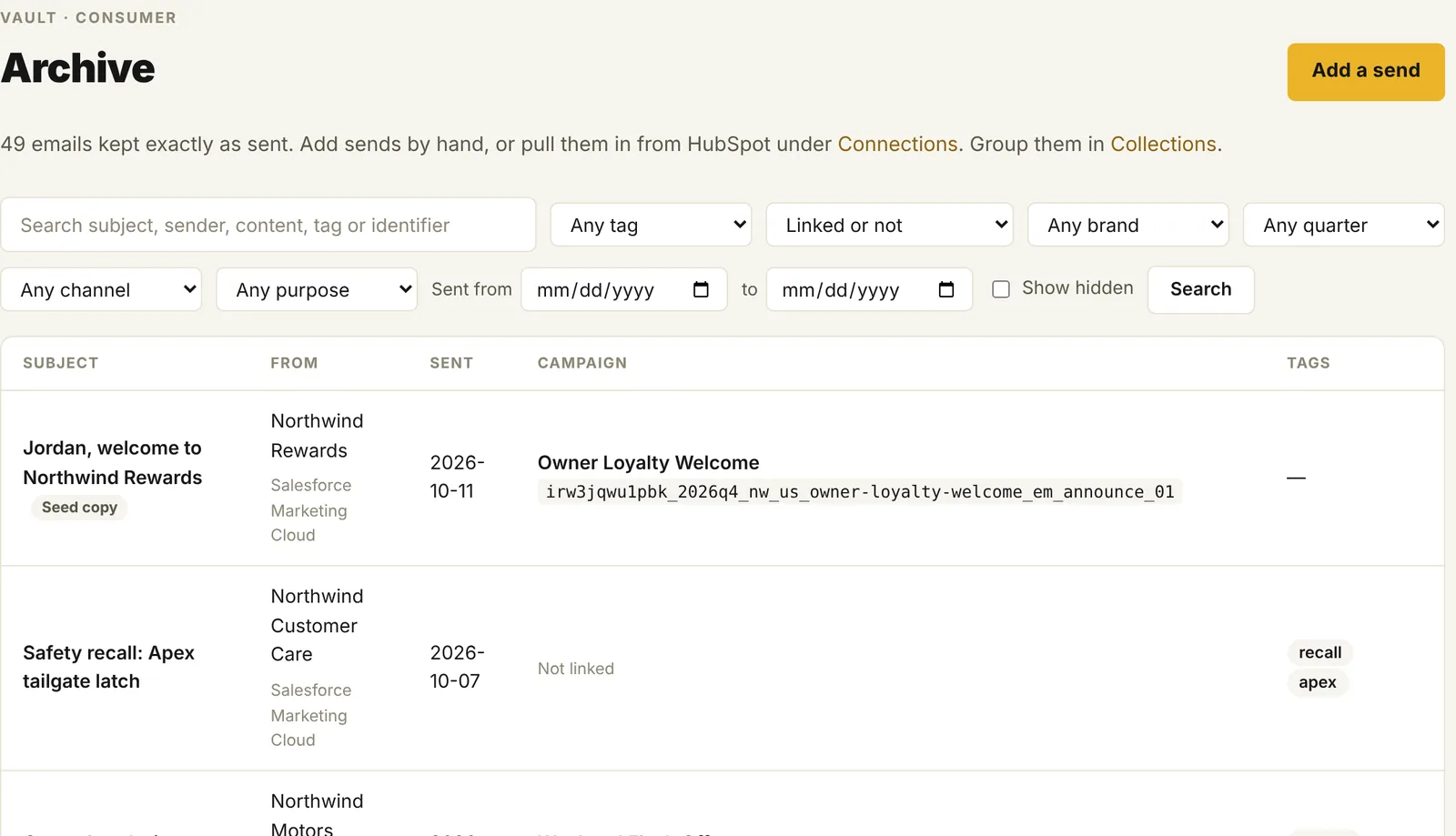
  • Search by words, tag, brand, quarter, channel, purpose, date and platform
  • Multi-brand, kept for as long as your account
  • A Vault address per workspace: add it to your sends and every email it receives is kept and filed by its identifier
  • Seed copies: the email that actually arrived at your seed address, kept as the record
8 ESP connections Multi-brand Full audit log
Etch.Vault · Archive
The Etch.Vault archive: every email kept and searchable by subject, words, tag or identifier and linked to its campaign

Every send, filed by its campaign. Seed copies show the email exactly as it arrived; HubSpot, API and hand-added emails sit beside them, searchable across brands — each one carrying its campaign ID.

Turns your own record into ready-to-use analytics. Predictions judged against your history, insights that flag what changed, and a brand voice measured from what you actually sent — every insight cites the exact campaign and metric behind it.

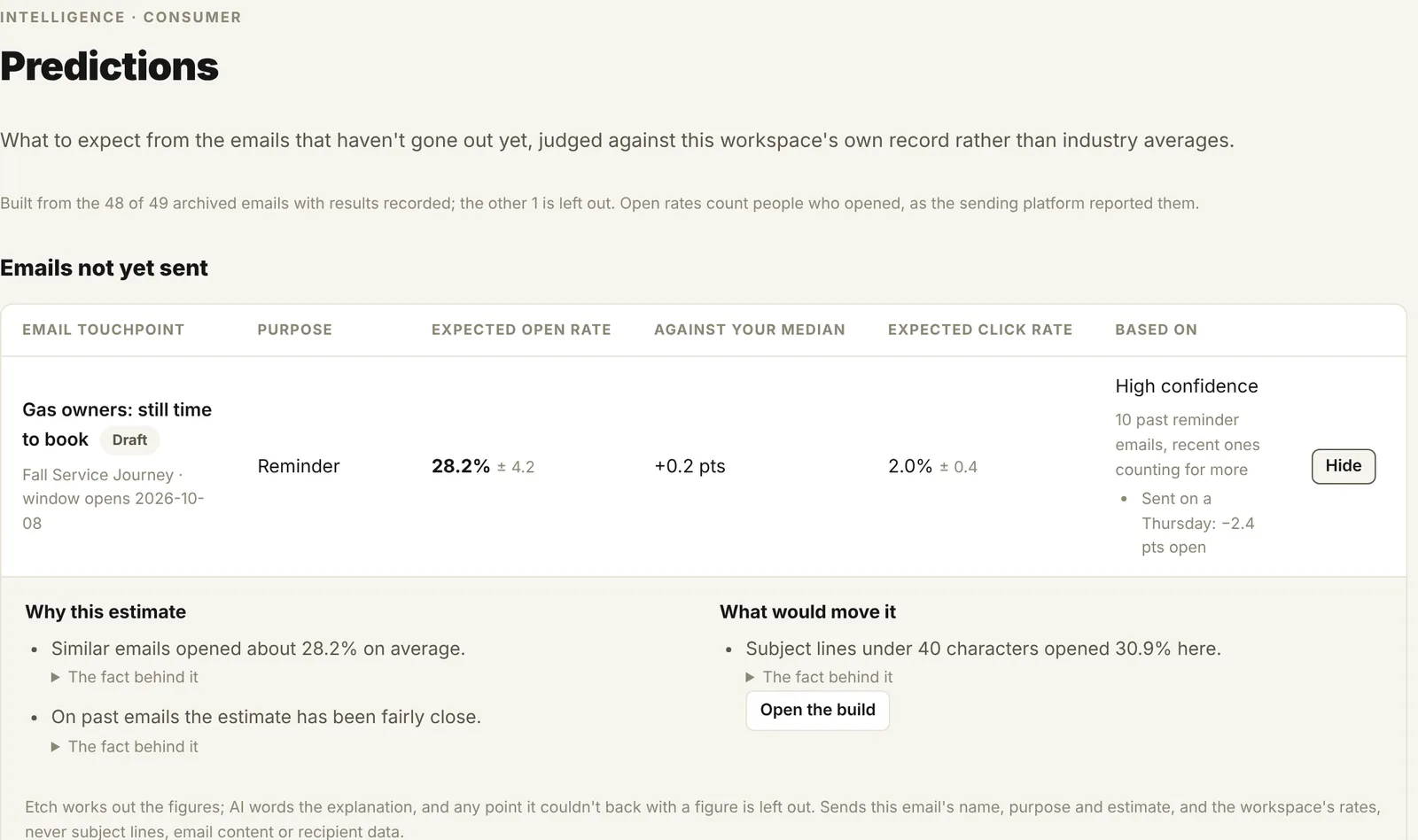
  • Predictions for emails not yet sent, each with "Why this estimate?"
  • Insights flag drops in opens and spikes in unsubscribes or bounces
  • Brand voice measured from the emails you actually sent
  • Ask Etch: questions about your records, answered with links to them
  • Every insight traced to a specific campaign and metric
Pro and up Ask Etch on every plan
Etch.Intelligence · Predictions
Etch.Intelligence predictions: an expected open rate for an email not yet sent, with the figures behind the estimate

Not a module — a layer. Intelligence reads across everything you've etched and feeds the next brief. Included on Pro and up.
Also on Salesforce. Two native Salesforce apps — Etch.Taxonomy for Salesforce (campaign governance on custom objects, a separate product built on the Etch identifier framework) and Etch.Monitoring for Salesforce (Marketing Cloud + Data Cloud health). On a page of their own. Visit /salesforce →

New in the private beta

Proof, not promises.

Etch checks the words, links, personalisation and versions of every email: before it goes, against the design, and after it lands.

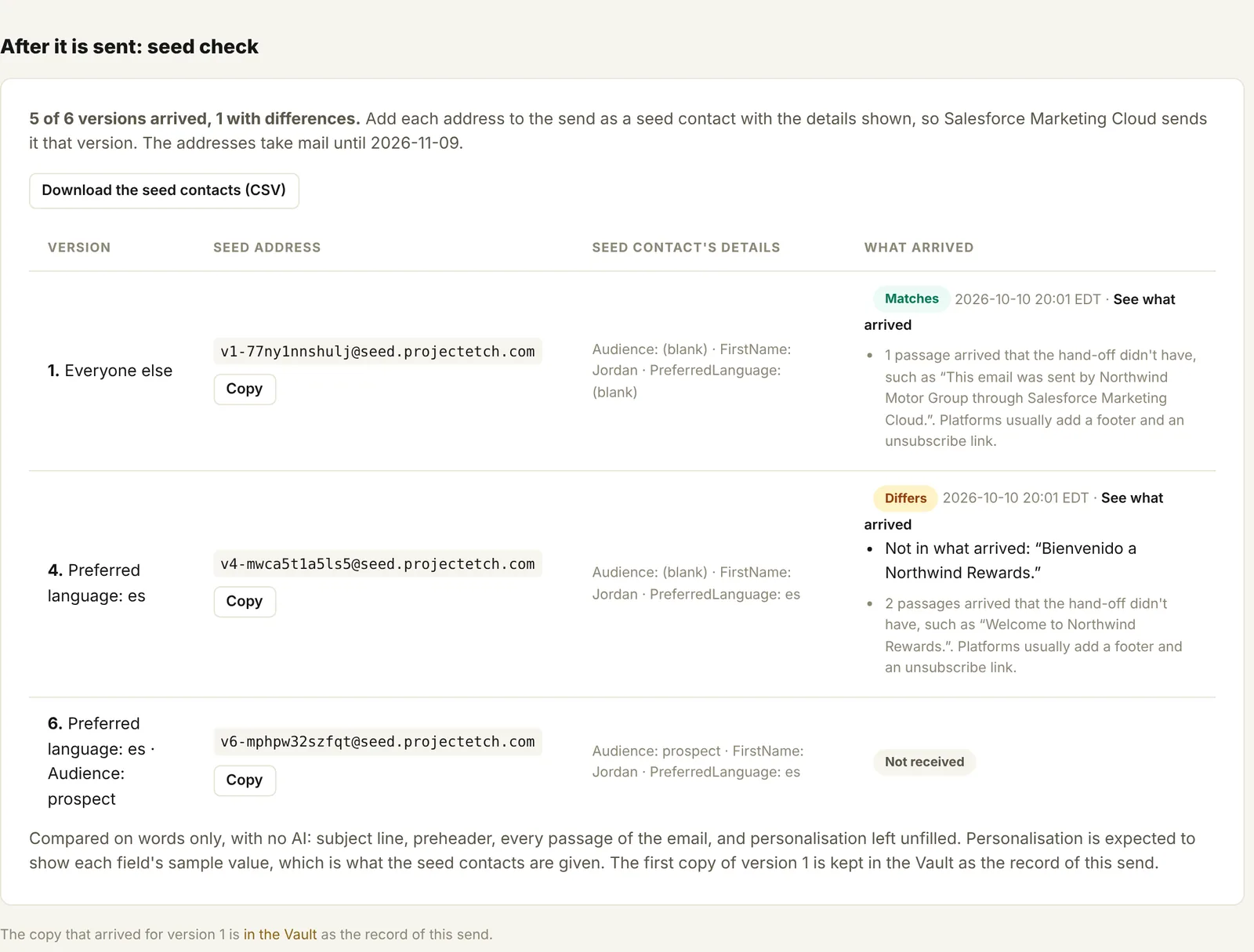
Seed check · after it is sent
A seed check in Etch: one seed address per version of the email, with each copy marked as matching, different or not received

Proof it went out exactly as approved.

Etch makes a seed address for every version of an email (by language, region or audience). Add them to the send, and every copy that lands is compared with what was approved: wrong words, missing preheaders and unfilled merge codes are flagged. The copy received becomes Vault's record of the send.

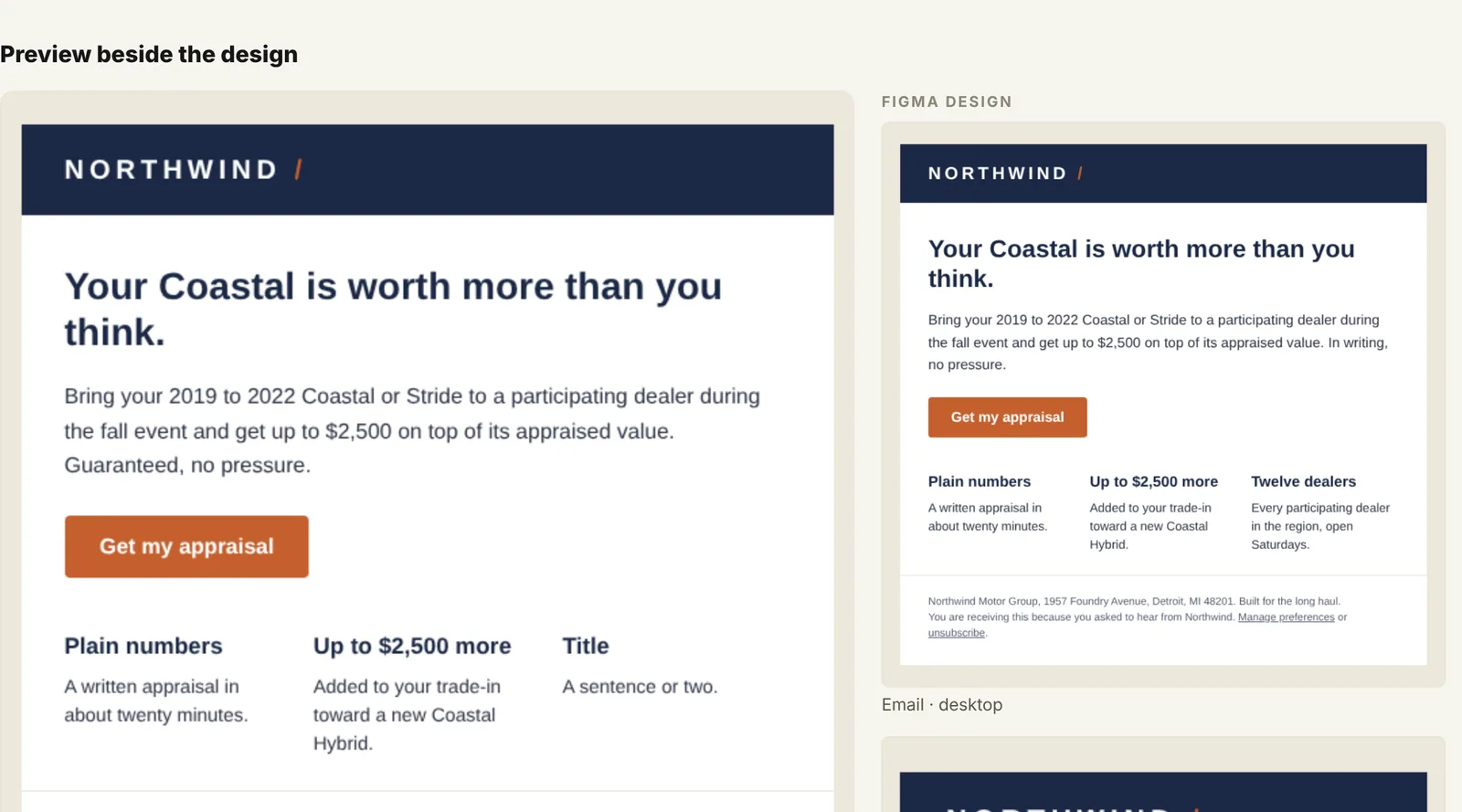
Figma · preview beside the design
An email build in Etch shown beside its Figma design, so reviewers can compare them

The design travels with the brief.

Attach a Figma frame and every reviewer sees the design beside the email, inside Etch or from a review link. Fill the build from the design's text, see every word that differs, and know when the file changes in Figma.

AI on your terms

  • Names that follow your standard, brief drafts, and subject lines in your brand's voice
  • Ask Etch about your records and results
  • Off until an admin switches it on; never sees recipient data or email addresses

Built for security reviews

  • Two-factor sign-in for everyone, or your company's own single sign-on (SAML)
  • Workspaces kept apart for brands, regions or clients
  • Public API, MCP server and a daily export to your own Google Cloud

Pricing · per company, not per seat

Every plan covers the core loop.

Per-company pricing — never per-seat, so the audit log stays honest. Standard covers the core loop; Pro and Enterprise add Etch.Intelligence and include every current and future Etch product.

What plan is best for you?

Every plan is priced per company, never per seat. Here’s what each one includes; prices come at launch.

What’s included StandardThe core loop for a small team ProThe whole platform, with IntelligenceMost popular Enterprise / AgencyMany brands, regions or clients
Modules
Etch.Taxonomy · one naming standard, governed campaigns and touchpoints
Etch.Brief · briefs, builds, sign-offs and hand-offs
Etch.Vault · every sent email kept, searchable, with its results
Etch.Intelligence · insights, predictions and reports from your own results
Modules added later
Every plan
One permanent ID for every campaign and touchpoint
Approvals and a full audit trail
Search and links across every module
Hand-offs for HubSpot, Marketing Cloud, Klaviyo and Braze
The public API
Two-factor sign-in for everyone
Room to grow
PeopleUp to 3Up to 15Unlimited
New campaigns a month1025, 50 or 75Unlimited
Workspaces, for brands, regions or clients1Up to 3Unlimited
A workspace for each client (Agency)
Included Not included

Etch is in private beta — full pricing goes live at launch.

Per company, never per seat. Every plan includes Brief, Taxonomy and Vault; Pro and up add Etch.Intelligence. Join the VIP list to see pricing and get early access before anyone else — plus a say in what we ship first.

FAQ · by product

Questions, answered.

The platform

How is Etch priced?
Per company, never per seat — so adding Legal, Brand, or an agency reviewer never costs you a license. Every plan includes Brief, Taxonomy and Vault, and Pro and up add Etch.Intelligence. We're finalizing pricing for launch — join the VIP list to see it first.
What if we pick the wrong size?
You won't have to guess. Your 14-day trial has the room of Pro 75, so you can run real campaigns and see your own volume. Everything you make in the trial is yours to keep when you subscribe, and doesn't count toward your first month. If you outgrow your plan, move up from Billing & plan at any time; going over a limit is never charged.
Do we have to adopt everything at once?
No. Each module is complete on its own — start where it hurts most (usually Vault or Taxonomy) and switch the rest on in any order. The record compounds either way: everything you etch is already linked when the next module lights up.
Who owns our data — and can we get it out?
You do, unambiguously. Download your campaigns and touchpoints to Excel at any time, use the public API, or set up a daily export of your taxonomy to your own Google Cloud project. If you cancel, your plan runs to the end of the term you paid for, so there's time to take everything with you.

Etch.Brief

Do we have to rebuild our email templates?
No — bring your existing HTML. Templates are annotated into governed blocks: editable regions for your writers, locked regions for legal footers and brand elements. Designers and agencies keep working in their own tools and drop HTML into blocks; Etch sanitizes and QA-checks it on paste.
How do Legal and Compliance review without Etch licenses?
Reviewers get an email with a scoped, expiring link — no account, no seat, no login. They see the creative exactly as it will ship (every version of it), approve or ask for changes, and the decision lands in the campaign's audit trail under their email identity. Ask a whole group, and the first answer counts for all of them.
Can we do dynamic content and personalization without AMPscript or Liquid?
Yes — that's the point. Variants and personalization tokens are declared in Etch against your own registered attributes, previewed and QA-checked as a complete set, then compiled into your ESP's native syntax at hand-off (HubSpot, Marketing Cloud, Klaviyo or Braze). After the send, the seed check keeps the copy each version actually received, so "what did members see?" stays answerable years later.
How do we know the email went out as approved?
With the seed check. Etch makes a seed address for each version of a handed-off email; add them to the send as seed contacts. When the email goes out, every copy is compared with what was approved, word for word, and Etch shows what matches, what differs and what never arrived. No AI is involved, and the first copy becomes Vault's record of the send.
Does Etch test how emails render in each inbox?
No, and on purpose. Keep using Litmus or Email on Acid for how an email looks across clients. Etch checks what it says: the words, links, identifiers, personalisation and every version, before it goes and after it lands.

Etch.Taxonomy

What's the difference between the System UID and the Marketing Identifier?
The System UID (like a8f3k2) is minted once, immutable, and used everywhere as the join key. The Marketing Identifier is the readable ID built from your own framework — brand, market, period, slug — and it's fully admin-configurable. One is for machines and permanence; the other is for humans and reporting.
What happens if a campaign needs to change after approval?
Nothing gets silently rewritten. Once approved, a campaign's identifier never changes, so archived sends, UTM links and reports never break; if the campaign itself needs to be different, that's a new campaign with its own ID. Its other governed fields change through a propose → re-approve flow, versioned and audited, with the reason on record.

Etch.Vault

Which ESPs are supported?
Eight: HubSpot, Salesforce Marketing Cloud, Braze, Klaviyo, Mailchimp, Iterable, Customer.io and ActiveCampaign. Vault brings in each one's send results, and archives HubSpot emails too. Etch only reads from them. Brief's hand-off gives you the finished HTML to load into your platform, in its own syntax for HubSpot, Marketing Cloud, Klaviyo and Braze.
Does Vault capture what we sent before Etch?
Partly. Connecting a platform brings in the last 90 days of its send results, and for HubSpot the last 90 days of emails as HubSpot keeps them. Emails from other platforms arrive from then on when you add the workspace's Vault address to your sends; older ones can be added by hand or through the API. From then on, a seed address added to a hand-off keeps the email exactly as it arrived.

Etch.Intelligence

Is our data used to train shared AI models?
No. Brand-voice profiles, insights, and predictions are learned from your workspace's record only, scoped to your workspace only. Your archive makes your next brief smarter — not anyone else's, and not ours.
What does Etch's AI see?
Only what each feature needs, and never recipient data, email addresses or passwords. Suggesting names sees your naming standard; subject-line ideas see your past subject lines; Ask Etch sees the record names, statuses and results it looks up. AI is off until an account admin switches it on.

Salesforce

Are there native Salesforce apps?
Two — and they're separate products from the web platform. Etch.Taxonomy for Salesforce brings campaign governance into your org on custom objects, built on the same Etch identifier framework as the platform's Taxonomy module. Etch.Monitoring for Salesforce watches your Marketing Cloud instance and the Data Cloud segments behind it. Taxonomy for Salesforce is available now, licensed and implemented through Procloud Labs; Monitoring is in development. Both are coming to the AppExchange. See /salesforce →

Be first to etch.

Join the VIP list and you'll be among the first marketing operations teams invited when early access opens — plus a say in what we ship first.

You're on the list. We'll be in touch the moment early access opens.

By joining, you agree to our Privacy Policy — one email topic, working unsubscribe, no spam.